

Download videos from Twitch download streams, clips and VOD with one click

Save videos from any platform: Twitch, YouTube, TikTok, Instagram, X (Twitter), VK, RuTube and many others quickly and without restrictions

Paste a link to a stream, clip or VOD from Twitch to instantly download the video in its original quality, without registration and advertising

How to download videos from Twitch

How to download videos from Twitch and save the best gaming moments forever

Twitch is the world's premier gaming platform, where tons of unique content is created every day. Here streamers go through complex games, share emotions, chat, and viewers witness historic moments: first victories, epic failures, rare skins and just heartwarming conversations. But Twitch has one cruel feature VOD (Video on Demand), i.e. recordings of past broadcasts, disappear after 14-60 days (depending on the status of the partner). Though clips are kept longer, but they too can be deleted or the streamer can close the channel.

You watched a cool stream yesterday, and today you want to review a key moment, but the broadcast has already been deleted? Or you want to save a funny clip with your participation in the chat to later throw to a friend? Twitch doesn't give you a "Download" button. That's exactly what our online Twitch Video Downloader is for.

Unlike streaming, your downloaded video always stays on your hard drive or in your phone's memory. You can re-watch it without internet, edit cuts or just collect memorable moments of your favorite streamers.
Download video from Twitch

How does it work?

Our Twitch video uploader makes it as easy as possible to save your content. Just three simple steps:

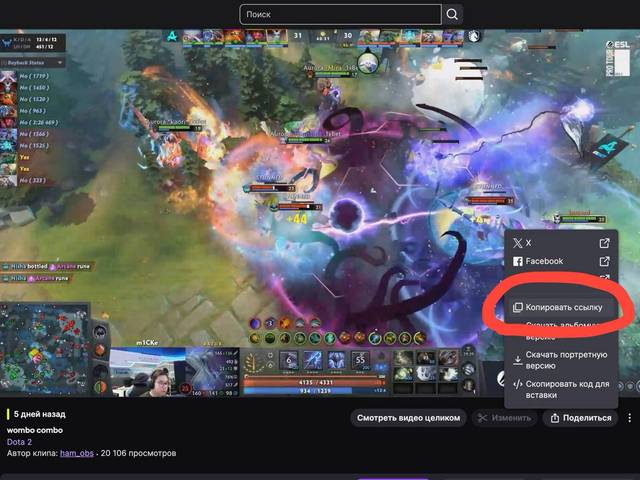
  1. Copy the link. Go to Twitch, open the desired clip or VOD (past broadcast). Copy the link from your browser's address bar. For clips, the "Share" → "Copy Link" button will also work.
  2. Paste it into the downloader. Go back to our site, paste the copied link into the box above and click "Download".
  3. Save the result. The system will process the request and offer you to download the finished MP4 file in the best available quality.

Why do users choose our service?

There are many tools for downloading Twitch on the Internet, but most of them are crude browser extensions that stop working after every site update, or sites full of ads. We offer a stable and convenient solution for real Twitch fans.

Downloading VOD and clips: We support both types of content. Want to save a story game walkthrough in its entirety? Easy. Want to cut out a funny moment 30 seconds long? No problem either. Our Twitch video downloader online works with all links.

Original video quality: You get the video exactly as it was broadcast. Most streams are in 720p or 1080p (Source). We preserve the original quality without compression. If you need to download video from Twitch in high quality, you are at the right place.

Working with m3u8 streams: Twitch uses a sophisticated video streaming system (HLS m3u8). Our service knows how to properly "glue" these segments into one solid MP4 file, which is convenient to store and play on any device.

Downloading live streams? Our downloader works with already completed broadcasts (VOD) and clips. If the stream is going on right now, you can't download it on the fly, you need to wait until the end for the video to appear in the recordings.

Forget the fear of losing an epic moment. Save the best streams, clips and walkthroughs of your favorite games from Twitch to your computer or phone and enjoy watching anywhere: on the train, in the subway or at home without internet. Our service is a fast and free way to create an archive of your favorite content, which will not disappear after VOD deletion.

Advantages

🎥

Downloading VOD and clips

We support all types of videos on Twitch: full stream recordings (VOD) and short clips. Just paste the link and we will detect the format automatically.

Instant processing

Our server processes links in seconds. You don't have to wait for conversion downloading ready MP4 will start immediately after analyzing the video.

🔊

Full sound and picture

Unlike some technically challenging platforms, we always give you a finished file with perfectly synchronized audio and video tracks.

🔒

Safe and anonymous

We do not store your download history or request access to your Twitch account. All files are deleted from the server immediately after downloading. No registration and no viruses.

🌍

Works on all devices

The user-friendly interface is adapted for PCs, tablets and smartphones (Android/iOS). Download videos from Twitch directly in your browser without installing apps.

💯

Completely free

We don't charge for using the service. Download as many videos and clips as you want without limits, subscriptions and hidden fees.

Frequently Asked Questions

No, you cannot directly download a live stream using our service, as the video is not yet complete and is not saved on Twitch servers as a whole file. You need to wait for the end of the broadcast, after which it will appear in the "VOD" tab on the streamer's channel. Copy the link to this recording and our downloader will download it easily.

This may be related to privacy settings. If the streamer enabled the "Subscribers Only" mode during the stream, or later made the VOD available only by subscription, our service (like any other public tool) will not be able to access the video. Look for public VODs or clips.

Yes, this is absolutely normal. High quality video (especially 1080p with high bitrate) takes up a lot of space. For example, a two-hour stream in good quality can weigh 3-5 GB. We download the original file without compression, so the size is the same as the original.

Very simple! Open our website in your phone's browser (Chrome, Safari), paste the link to the clip or VOD and press download. On Android, the file will appear in the "Downloads" folder. On iPhone, click "Download" and then save the video in the "Files" app or share it.

We try not to limit users. You can download both short clips (30 seconds) and hours-long streams (for example, 8-hour marathons or game walkthroughs). The only condition is the stability of your internet connection, as the files can be large.

Downloading content for personal use (to save your favorite stream to an archive and watch it later without internet) is usually not an infringement. However, publicly reposting downloaded VODs to other platforms or using them for commercial purposes without the streamer's consent may violate his/her rights. Respect the labor of the authors and use the downloaded videos for your personal collection.